Showing posts with label iso. Show all posts

Thursday, 8 July 2010

How to replace ISO contents in bulk

This guide by Pikazapper details an easier way to replace the files in an ISO. Rather than 1 at a time, you can replace the whole DATA partition at once. For single file replacement, check out thisguide.

You'll need WiiScrubber v1.4, Partition Builder v1.2 (found here), and a legally ripped NSMBw ISO.

Load up your NSMBw ISO into WiiScrubber. Right Click on the DATA Partition. Choose "Unencrypted Partition" -> "Extract". Be sure to save it in a folder with a name that's easy to remember! (like "NSMBw DATA Partition")


After it has finished extracting, expand the partition by clicking the "+" symbol next to it. Find these files and extract them (Right Click -> "Extract"): 'partition.bin' 'apploader.img' 'boot.bin' 'bi2.bin' and 'main.dol'. Save these in a folder separate from the DATA Partition, but somewhere you'll remember!

Once you're ready to put the files back into the ISO, open Partition Builder. It will need the 5 files you extracted earlier. Click on each button with "..." on it to browse for the file. After you've done this for each file, you'll have to point it to the folder that contains the DATA Partition you extracted earlier. I'm not exactly sure what the "Data Alignment" option does, so just leave it at "4.". Now click "Build." Click yes on the box that pops up. Choose where you want to save the Partition file (called "partition1.img" by default). Once it finishes, a message box will pop up saying "Partition file created". Close Partiton Builder.

Open WiiScrubber and load your NSMBw ISO. Right Click the DATA Partition and go to "Unencrypted Partition" -> "Load". Find the partition1.img file that Partition Builder created. After selecting it, WiiScrubber will replace the files in the ISO with the files in the Partition.img file. Once it has finished, use whatever method you use to load backups. I can't recall having any issues with this method.

Friday, 18 June 2010

Make Your Own Mods! (NSMB ISO Files)


Want to make your own textures but don't have the game files? Well now you can. Below are downloads for the 'Objects' and 'WorldMap' folders as well as a bunch of other game elements, straight from the NSMBw ISO, ripe for modding. For Objects you can either download the entire 'Objects' folder, which contains backgrounds and objects for the entire game, or download from a selection of the coolest, most modifiable individual files. Check out the file descriptions in the 'individual files' folder for more info regarding each file.

'Elements' contains stuff like save file banners and character selection icons (see file notes). Each individual file has a description. WorldMap contains information for the world maps and world selection screens.

Objects: zip | individual files
WorldMap: zip
Game elements: individual files
Fonts: font packs

Quick downloads
Mario | Luigi | Toads | Bowser
Yoshi 1 | Yoshi 2 | Yoshi 3 | Yoshi 4
Bowser Jr | Iggy | Larry | Lemmy | Ludwig | Morton | Roy | Wendy |

File Notes
'Game element' files of note are 'Message' (NTSC/PAL, which can be edited in SZS Modifier to change game text; 'preGame', which changes world banners on level load; and 'openingTitle' (NTSC/PAL, which contains the title screen logo (and must be edited using Wii.cs tools). You can change the game cursor and character icons too.

When editing Yoshi textures (in 'Objects' on your ISO), note that Yoshis 2, 3 and 4 share the same data but have different textures. This means you can save time and make a Yoshi texture for Yoshis 1 and 2, then copy and rename the Yoshi 2 textures (Y_TexYellow.arc) to Yoshi 3 and 4 (Y_TexRed.arc and Y_TexBlue.arc).

If you need to know what files are where on the disc, go here to view the entire contents (in text form) of the NSMB (PAL) ISO.

Thursday, 17 June 2010

NSMBw: The Next Levels


I've seen this on a few torrent sites, but only an ISO has been provided (which you can download in NTSC format here). For those of you wanting to play this game mod with riivolution, download this pack. It's got all the .arc level files, just drop them into your Riivolution level folder.

There's not a lot of information readily available, but it's a fully modded version of NSMBw, with all-new levels made with Reggie. It's been confirmed that at least some of these levels have just been downloaded from the NSMBw File Depot. So if you see your level in this pack, let me know and I'll give you credit here, as the creator/compiler of this pack hasn't. .

This is the torrent description from torrentreactornet:
Casper666 brings you Version 2 of New Super Mario Bros. Wii 2 - The Next Level... New Super Mario Bros. Wii 2 - The Next Level is harder than the Original game, with more Bosses and Extreme Levels! 90% of the Game has been Customized using Reggie!

There are some videos on youtube by karloz25 and Brawlplus. Wiitdb info here, GBATemp discussion here, torrent info here, and ISO download page here.

Brawl Bowser


Screenshots by Pikazapper

*Updated*
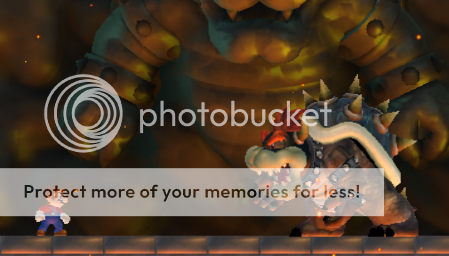
Want a badder Bowser? Try this version, which uses Bowser's Brawl textures to give him more of a grimey, menacing look. Thanks to Pikazapper for testing and screenshots. Download the Brawl Bowser texture here. Two more screenshots here and here.

If you downloaded the Bowser skins/June Pack before 18th June, read this. There were some problems getting Bowser skins to work, as there are 2 'koopa.arc' files on the disc, so you need to tell Riivolution which one to patch. Your XML patch ID entry for the texture needs to look something like this. If you have the June Pack, download this updated XML, and use it to replace the existing one in the 'riivolution' folder.

Wednesday, 16 June 2010

Giga Bowser


Screenshots by Pikazapper

Many people were upset at the lack of Giga or Dry Bowser in NSMBw. Well, now you can fight the baddest incarnation of Bowser yet! Thanks to Pikazapper at the rvlution.net forums for testing and screenshots. Download the texture on its own here, or with everything you need to use it in the July Pack here.

Note that you need to create an XML that will point directly to the 'koopa.arc' in the 'Objects' folder, otherwise (if you're using it) Riivolution will patch only the 'koopa.arc' in the MovieDemo folder. View the details of the XML here.

Monday, 14 June 2010

How to replace files on an ISO

Update! To replace more than one file at a time, take a look at Pikazapper's guide to replacing the entire disc's contents here.

If you're loading NSMBw from backups, you can use WiiScrubber to replace files on the game's ISO and create a custom IOS, eg replacing 'Mario.arc' in the objects folder with a 'Mario.arc' downloaded from Mario-mods, or the '01-02.arc' level file with another downloaded from the NSMB File Depot. You can then run your custom NSMBw ISO with a USB loader or Dolphin (a wii emulator).

If you can't find where the file you want to replace is on your ISO, check out this list of the NSMBw disc contents. You can, for example, search for 'Mario.arc' (it's the second one, in the 'Objects' folder).


To get an ISO for NSMBw, use WiiDump or a similar program to rip a NSMBw ISO from the disc to an SD card or USB device.